The cellular WAN quality is one of the first things to check when cellular routers are deployed.
Both InControl and the router web interface show detailed cellular information in several places.
But what do the acronyms and values mean? Let’s have a look.
The cellular WAN quality is one of the first things to check when cellular routers are deployed.

The following acronyms are used to indicate 3G and LTE signal quality:
| RSSI | Received Signal Strength Indicator | Signal Strength | 3G and LTE |
| EC/IO | Energy to Interference Ratio | Signal Quality | 3G |
| RSRP | Reference Signal Received Power | Signal Strength | LTE |
| RSRQ | Reference Signal Received Quality | Signal Quality | LTE |
| SINR | Signal to Interference-plus-Noise Ratio | Throughput | LTE |
Below is an indication of the signal interpretation.
When installing cellular solutions you are often limited by environmental factors and the available networks in the area, but by using a site survey you’ll always be able to pick the most appropriate location for the router. Additional external antennas can make a huge difference if you can’t install the router in the optimal location.
| EC/IO | RSSI | RSRP | RSRQ | SINR | |
|---|---|---|---|---|---|
| Excellent | 0-6 | -70 dBm | > -90 dBm | > -9 dB | >10 |
| Good | -7 to -10 | -70 dBM to -85 dBm | -90 dBm to -105 dBm | -9 dB to -12 dB | 6 to 10 |
| Fair | -10 to -14 | -86 dBm to -100 dBm | -106 dBm to -120 dBm | -12 dB to -15 dB | 0 to 5 |
| Poor | -14 to -20 | > -100 dBM | -120 dBm | -15 dB to -20 dB | <0 |
Both InControl and the router web interface show the cellular details in several places.
We use the router’s web admin console if we need to view real-time values, because there can be a slight delay in sending these details to InControl.
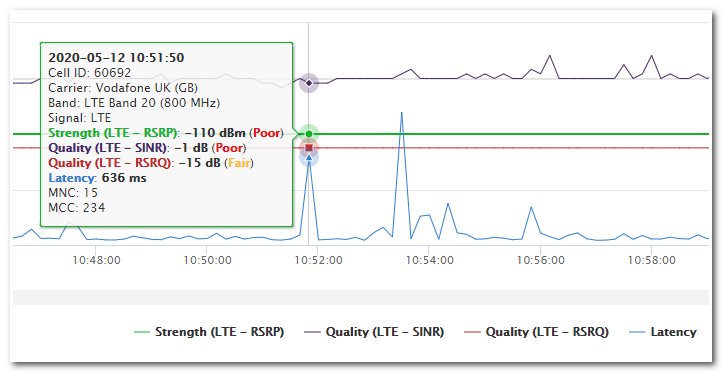
We use the InControl WAN quality report for regular monitoring and fault finding.
The report shows the signal information in a selected time period and also includes latency details for the selected time-period.
This makes it possible to investigate historic issues with a cellular connection.